Mopkin: AI Cleaning Buddy. Clean one task at a time
Mopkin cleans with you. One tiny step at a time.
Mopkin is a free AI cleaning app for iPhone. Frozen by a messy room? Snap a photo and Mopkin spotlights exactly where to start.Frozen by a mess? Snap a photo and Mopkin shows you exactly where to start.
Helped me clean my room in less than 2 minutes kinda crazy
App Store review- Free
- No account
- No subscription


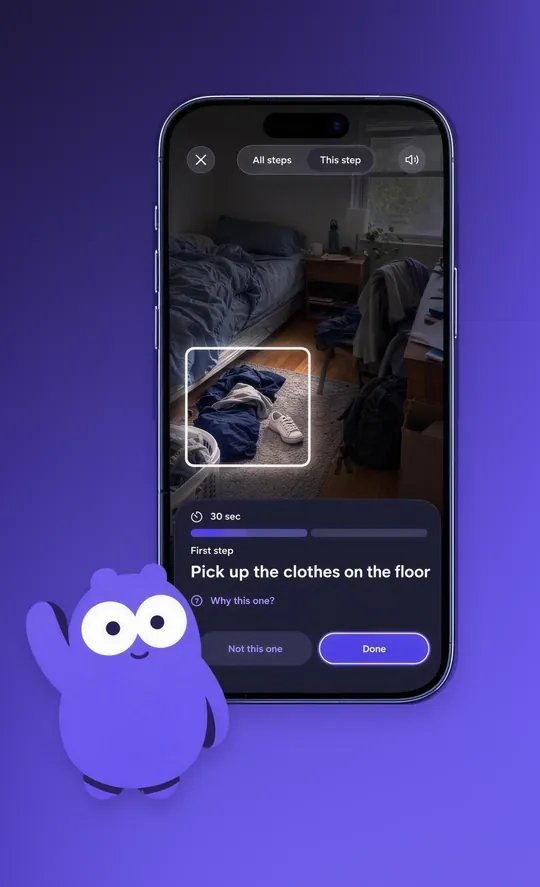
First step
Pick up the clothes on the floor
It’s the biggest pile, and clearing the floor makes the whole room feel better fast.
Now try it on your own room. Free, no account.

What is Mopkin?
Mopkin is a free AI cleaning app for iPhone that tells you where to start. Snap any mess and Mopkin, a little purple cleaning buddy, spotlights one tiny, doable step. Finish it, and the next one appears.
On the App Store it’s Mopkin: AI Cleaning Buddy.
Examples of tiny cleaning steps Mopkin can give you
- 1 minClear the nightstand
- 2 minMake the bed
- 20 secHang up your jacket
- 1 minPut the dishes in the sink
- 1 minGather the cups from your room
- 30 secToss the old receipts
- 1 minWipe the bathroom counter
- 15 secPut the shoes by the door
- 1 minTake out the trash
- 30 secStack the books on the desk
- 45 secFold the blanket on the couch
- 20 secWater the plant on the sill
- 30 secPut the laundry in the basket
- 2 minClear the kitchen table
The hardest part is starting: Don’t know where to start? Mopkin does.
You look at the whole room, freeze, and close the door. Mopkin shrinks it to one thing you can do right now. Then the next.
Mopkin hides everything except the next tiny thing.
How Mopkin works: Snap. Spotlight. One tiny step.
Real screens from the Mopkin app.
-
1Snap the mess
Start with one photo
No lists to write. No plan to make.
Open Mopkin and take a photo of the room, desk or counter that’s bugging you. That’s all the setup there is.
-
2Spotlight
Your space. Your next task.
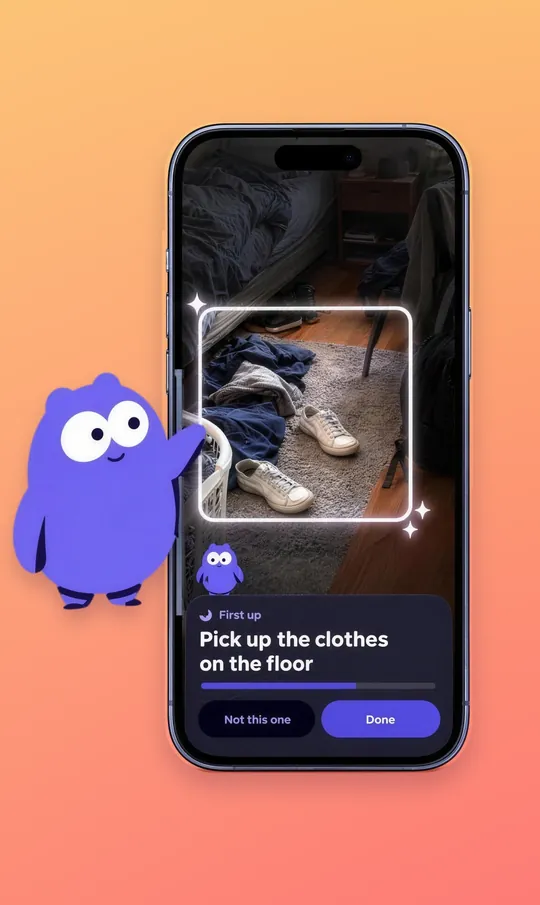
Mopkin spotlights exactly where to start.
Mopkin looks at your photo and draws a glowing box around the first thing to tackle, like the clothes on the floor. No guessing, no planning.
-
3One step
One task at a time
Always know the next small step.
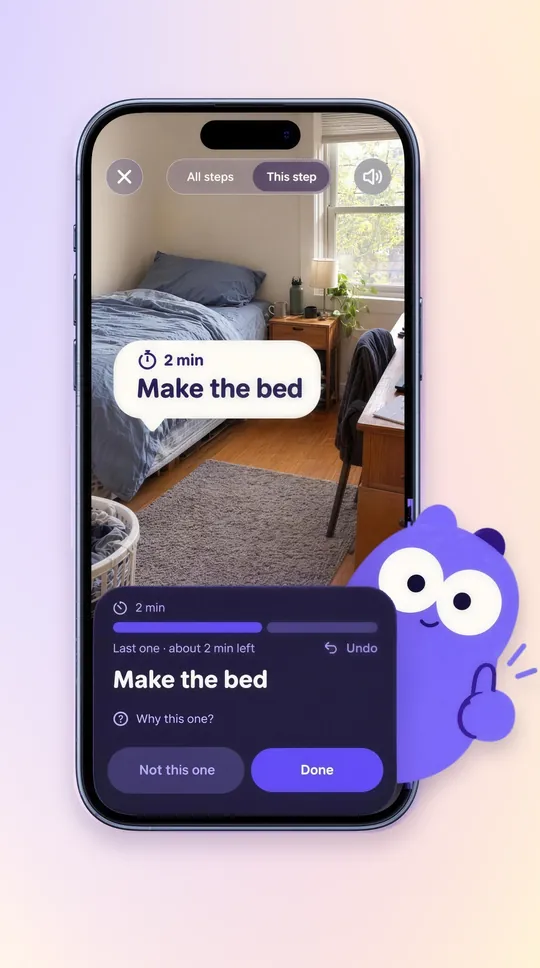
Each step has a short timer, from 30 seconds to a couple of minutes. Tap Done for the next one, Not this one to swap it, or Why this one? to see Mopkin’s reasoning.
-
4Watch it change
See your progress take shape
A preview that builds as you go.
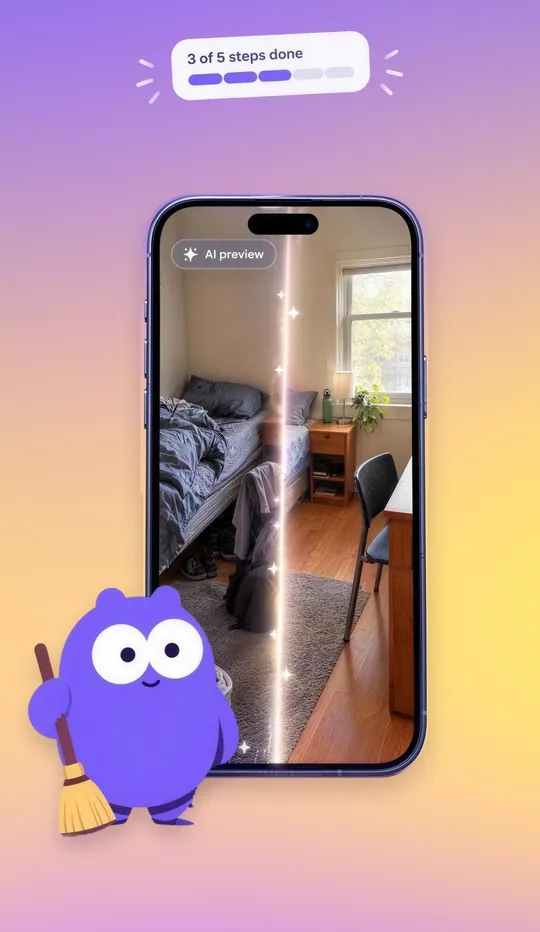
Mopkin’s AI preview shows how your space could look, and fills in a little more with every step you finish.
-
5Celebrate
Finish with a little celebration
Your clean, wrapped up.
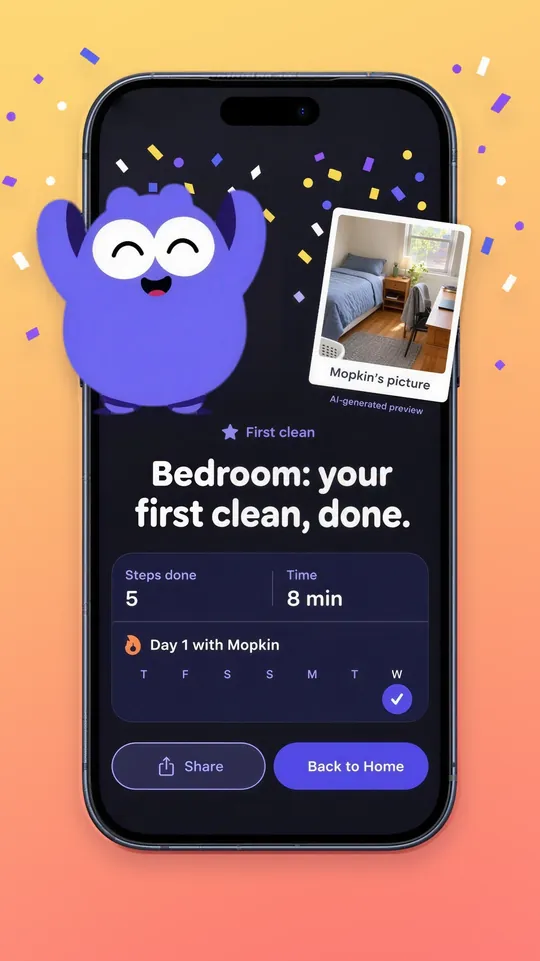
Confetti, the steps you finished, how long it took, and Mopkin’s picture of your fresh space. Share it if you’re proud.
-
6Keep going
Small cleans. Daily momentum.
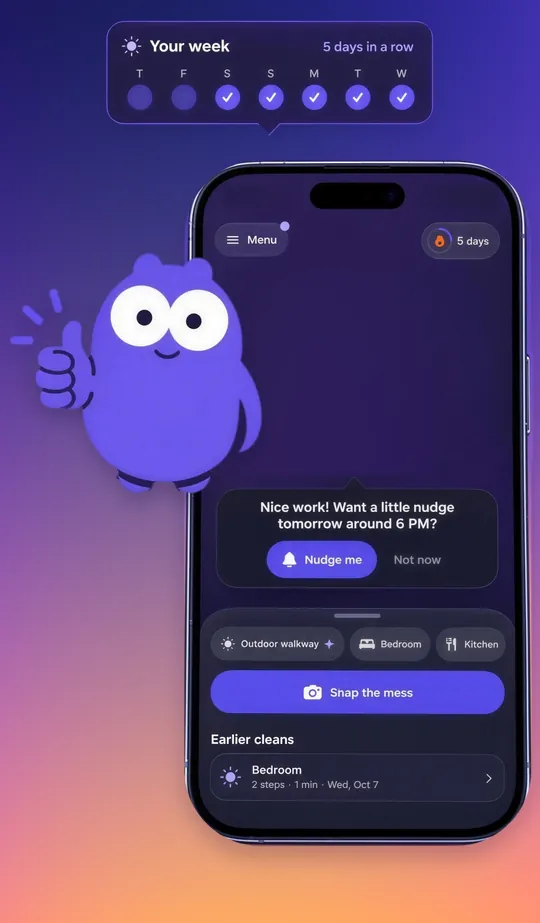
Build a streak, one tiny step a day.
See your week at a glance and your earlier cleans. Want a reminder? Mopkin can nudge you tomorrow, or you can say Not now.


Mopkin on your Lock Screen: Put your phone down. Keep going.
Your next step waits on your Lock Screen and in the Dynamic Island. Tap Done right there and the next one appears.
No digging through apps, no getting sidetracked. Just the next small thing, until the room is done.



An example of Mopkin’s Live Activity: the Lock Screen shows “Bedroom, step 1 of 4: Pick up the clothes on the floor, about 4 minutes left” with a Done button, and the Dynamic Island shows 1 of 4.
Mopkin reviews from the App Store: The first reviews are in
Terrific
“My little buddy will tell me what to do, one thing at a time. Great for when I feel overwhelmed!”
So easy to use
“Helped me clean my room in less than 2 minutes kinda crazy”
5.0 from 2 App Store ratingsSee Mopkin on the App Store

Who Mopkin is for: A cleaning app for brains that freeze at a big mess
For when you open the door, see the mess and quietly close it again. Lots of people with ADHD, busy parents, students and anyone low on energy know that moment.
No giant to-do list
You see one step, never a wall of 40 chores.
Skip a step, no guilt
Not feeling it? Tap Not this one and get a different step.
Fits low-energy days
Steps take seconds to a few minutes. Tell Mopkin your energy and it keeps the first one realistic.
Small wins add up
A little celebration after every clean, and a streak that grows one day at a time.

Is Mopkin free?: Free. No account. No subscription.
Mopkin is completely free. No sign-up, no login, no paywall. Nothing Mopkin collects is linked to you.
- 1Get Mopkin, it’s free
- 2Snap your messiest spot
- 3Do one tiny step
Mopkin FAQ: Quick answers
Will Mopkin work on my iPhone?
Mopkin works on iPhone 11 and newer with the latest iOS (iOS 26). If your iPhone is up to date, you’re set.
Is Mopkin good for ADHD or feeling overwhelmed?
Mopkin is built for the moment a mess feels too big and you don’t know where to start, which many people with ADHD know well. It breaks a room into tiny steps and hides the rest. Mopkin is a cleaning app, not a medical or therapy app. For more ideas, read our guide on how to clean with ADHD.
What if my whole home is a mess?
Start with one spot. Snap the messiest corner, do a step or two, and stop whenever you like. When you’re ready, snap the next spot. Mopkin works on any space, like a bedroom, kitchen, desk or even an outdoor walkway, and it keeps your earlier cleans so you can see what you’ve done. There’s more in our guide on how to clean a messy room.
Does Mopkin link my data to me?
No. Mopkin’s App Store privacy label says the data it may collect, such as location, usage data and diagnostics, is not linked to your identity. There’s no account to create.
More questions
Is Mopkin free?
Yes. Mopkin is completely free to use. There’s no subscription, no paywall and no sign-up. Download it from the App Store, open it, and start right away.
Can I skip a step I don’t want to do?
Yes. Tap Not this one and Mopkin gives you a different step. Tap Why this one? to see why Mopkin picked it, and Undo if you tapped Done by mistake.
Does Mopkin remind me to clean?
Only if you want it to. After a clean, Mopkin can offer a gentle nudge for the next day, such as around 6 PM. You can always choose Not now.
Can I see my next step without opening the app?
Yes. While you clean, your next step stays on your Lock Screen and in the Dynamic Island, with how many steps are left and about how long. Tap Done right there and Mopkin shows you the next one.
What is Mopkin?
Mopkin is a free AI cleaning app for iPhone, listed on the App Store as “Mopkin: AI Cleaning Buddy.” You snap a photo of a messy space, and Mopkin spotlights where to start and gives you one short, doable cleaning step at a time instead of a full checklist.
Do I need an account to use Mopkin?
No. Mopkin doesn’t need an account. There’s no sign-up and no login. Open the app and snap your first mess.
Is Mopkin available on Android?
No. Mopkin is an iPhone app on the Apple App Store, and there is no Android version.
How does Mopkin work?
Mopkin works from a photo. Snap a picture of any space, like a bedroom, desk or kitchen. Mopkin spotlights exactly where to start and shows one small step with a short timer, such as “Pick up the clothes on the floor, 30 sec.” Tap Done for the next step, or Not this one to swap it. You can also tell Mopkin how much energy you have, so the first step stays realistic.
What is Mopkin’s AI preview?
As you finish steps, Mopkin shows an AI-generated preview of how your space could look when it’s tidy, and the preview builds as you go. It’s a picture made by AI to show your progress, not a photo of your room.
How is Mopkin different from other cleaning apps?
Most cleaning apps hand you a checklist or a chore schedule. Mopkin shows only the next small step and spotlights exactly where it is, because deciding where to start is usually the hardest part of cleaning a messy room.
Is there an app that tells you what to clean first?
Yes. Mopkin is a free iPhone app that does exactly that. Snap a photo of a messy room and Mopkin spotlights the first thing to clean, like the clothes on the floor, then gives you the next small step each time you tap Done. Read more about using an app that tells you what to clean.
Can AI help me clean my room from a photo?
Yes. Mopkin uses AI to look at a photo of your room, pick a good first step and frame it with a glowing spotlight and a short timer. As you finish steps, it also builds an AI-generated preview of how the space could look.
Is there a free cleaning app with no subscription?
Mopkin is free, with no subscription, no paywall and no account. Download it from the App Store and start with a photo of your mess.
Who makes Mopkin?
Mopkin is made by Bryton Zoz, who is listed as the developer and seller on the Apple App Store. Mopkin was first released on August 18, 2026, and its official website is mopkin.app.
Where can I download Mopkin?
You can download Mopkin for free from the Mopkin App Store page. On a computer, scan the QR code on this page with your iPhone camera.
Your first tiny step is waiting.
Free on iPhone. Snap the mess, and Mopkin shows you where to start.